Question
What Built-In and Third-Party Mobile Accessibility Features Should Audiologists Recommend to Patients Who Are Deaf or Hard of Hearing?
Answer
Overview: Power in Your Pocket
Modern smartphones - both iOS and Android - offer a robust suite of native accessibility features specifically designed to support individuals who are Deaf or Hard of Hearing (DHH). For audiologists, familiarity with these tools is essential because patients who have acquired hearing loss often do not know what they do not know. As Dr. Childress explains, the goal is to give patients tools for access and communication that extend beyond amplification — to show them that audiologists are thinking about more than just their ears. A comparison of key feature categories available across both platforms is illustrated in Table 1.
iOS | Android | |
|---|---|---|
| Speech-to-text transcription | Live Captions | Live Transcribe |
| Live captioning of media | Live Captions | Live Caption |
| Live captioning of phone calls and video calls | Live Captions | Live Caption |
| Environmental sound awareness | Sound Recognition | Sound Notifications |
| Phone as a remote microphone | Live Listen | Sound Amplifier |
| Customize audio level | Y | Y |
| Mono audio | Y | Y |
| Accessibility Shortcut | Y | Y |
| RTT/TTY | Y | Y |
| Recognizing non-standard speech | Vocal Shortcuts | Project Relate |
| Text-to-Speech | Personal Voice and Live Speech | Live Transcribe |
Table 1: A side-by-side comparison of iOS and Android native accessibility features for DHH users, including speech-to-text, captioning, sound awareness, and remote microphone capabilities.
iOS Accessibility: Key Hearing Features
On Apple devices, the primary speech-to-text feature is called Live Captions. It uses on-device AI to caption live conversations, phone calls, FaceTime, and media in real time, and it works offline. Compatible with iPhone 11 and later and iPhone SE (2nd and 3rd generation), Live Captions can be made more functional by enabling the Accessibility Shortcut - triple-pressing the side button toggles captions on and off instantly. Dr. Childress highlights this as one of her favorite features and strongly recommends that clinicians teach patients to use the shortcut for quick, real-world access. Apple devices also include Sound Recognition, which alerts users via visual or vibration notifications to environmental sounds such as fire alarms, doorbells, door knocks, a baby crying, or a dog barking - with the added ability to customize alerts for non-standard sounds.
Additional iOS features include Live Listen, which turns the iPhone into a remote microphone that streams audio directly to paired Made for iPhone hearing devices - particularly useful in noisy restaurants or group settings. Real Time Text (RTT) allows users to communicate via text during an active phone call and can be used to reach 911 in many areas where text-to-911 is unavailable. The Live Speech feature allows a user to type text that is then voiced aloud by the device, using either a synthesized system voice or a Personal Voice the user has recorded. These features collectively enable deaf and hard-of-hearing individuals to access a range of communication contexts without specialized hardware.
Android Accessibility: Google Live Transcribe and Live Caption
For Android users, Dr. Childress identifies Google Live Transcribe & Notification as her absolute favorite accessibility feature. Available free exclusively on Android, Live Transcribe provides AI-powered speech-to-text transcription in real time, supports many languages, allows the user to save the transcript, and works offline. It also incorporates sound notifications for environmental events such as smoke alarms, doorbells, baby sounds, and dog barks. Clinicians should note that Android's sound notification feature performs better with repetitive and mechanical sounds than with digital sounds, and it is not customizable. The Accessibility Shortcut in Live Transcribe places a persistent icon on the screen that activates captions with a single tap. A separate but related feature, Live Caption, is used specifically for captioning phone calls, video calls, and media - and includes Expressive Captions, which convey emotional and paralinguistic elements such as laughter, clapping, or shouting. Android's Sound Amplifier feature enables the device to function as a remote microphone, amplifying surrounding sounds or phone media with adjustable noise reduction and frequency boost controls.
Third-Party Apps: Extending Native Capabilities
Beyond native features, several third-party applications can further support deaf and hard-of-hearing patients. Otter.ai (available on iOS and Android) is notable for its transcription accuracy and its ability to identify multiple speakers; clinicians should advise patients that it records conversations and is free up to 300 minutes per month. The Make It Big app allows users to pre-save frequently used phrases - such as "I'm deaf. Please speak into my phone" - and display them in large text, eliminating the need to type repeatedly in situations where the patient does not use their voice. For patients interacting with speakers of other languages, Microsoft Translator supports a group conversation feature in which multiple participants join a shared room and see real-time captions from one another's devices. For phone call access, InnoCaption (free for DHH users) provides both AI-based and human-assisted CART captioning for phone calls, supports emergency 911 calling with priority routing to trained stenographers, generates AI-powered call summaries, and includes a text-to-speech feature and AI Refine - a tool that expands brief typed phrases into complete, fully-formed sentences before they are voiced to the other party (Image 1).
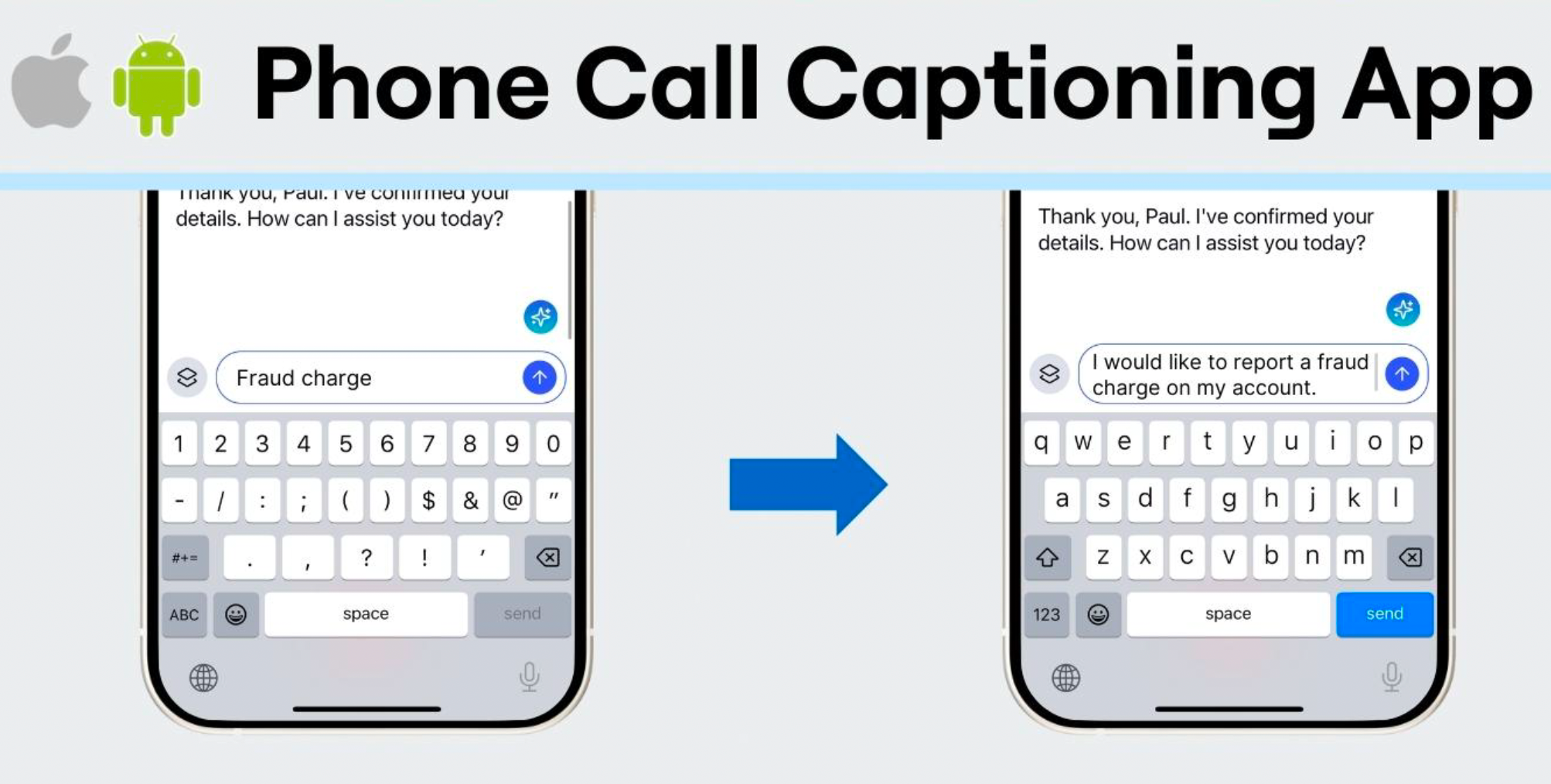
Image 1. InnoCaption's AI Refine feature expands brief, typed shorthand into complete, polished sentences, allowing DHH users to communicate fluidly during phone calls without long pauses.
Clinical Recommendations
Audiologists should begin by ensuring patients know the make and model of their smartphone, as features and setup paths differ by device and operating system version. Dr. Childress recommends clinicians become well-versed in Apple accessibility, given the higher prevalence of iPhone use in the DHH community, while also being able to speak to Android options for patients who use those devices. Introducing patients to accessibility shortcuts — quick-access toggles for Live Captions and Live Transcribe — is a high-yield strategy for immediate clinical impact. When background noise or distance reduces caption quality, pairing native features with external remote microphones (available for both platforms) can improve performance. Dr. Childress encourages audiologists to share these tools with patients and peers, and to point patients toward online communities and curated resource lists — including those available at TinaChildressAuD.com — where evolving technology updates are tracked. As she notes, doing so demonstrates that the audiologist is thinking about the whole person: not just amplification, but full access to communication.
This Ask the Expert is an edited excerpt from Course #41936, Childress, T.G. (2025). Power in Your Pocket – iOS and Android Accessibility Tools. AudiologyOnline.
Continued and its subsidiaries provide professional education authored by qualified Subject Matter Experts for continuing education purposes. These materials are intended for educational purposes and do not constitute medical advice or a substitute for individual clinical judgment. Continued is not a clinical healthcare provider; the licensed professional is solely responsible for ensuring that the application of any techniques or information presented is within their legal scope of practice and jurisdictional requirements.