
Question
Does the Oticon Medical Streamer work with Oticon products?
Answer
Yes, but only with certain Oticon models. Because the Oticon Medical Ponto Streamer and the Oticon Streamer Pro are different, the Oticon Streamer cannot be used with the Ponto and you can't use the Oticon Medical Streamer with most of the devices available through Oticon. Currently, there are six Oticon models that can be used in a bimodal mode with the Ponto Streamer:
- Sensei SP: Sensei SP, Sensei SP Pro
- Dynamo: Dynamo SP4, Dynamo SP6, Dynamo SP8, Dynamo SP10
Therefore, an adult or a child that has a Ponto 3 on one side, has the option of the Sensei Super Power and Super Power Pro, as well as all Dynamo devices on the opposite ear, and the patient can use one Streamer. Keep that in mind if your patients using Ponto are thinking about getting a second device or a hearing device and you want it to be able to work in conjunction with the Streamer.
The Ponto Streamer will enable your patients to connect to their cell phones. The Streamer has a telecoil in it, so it can be used with loop systems. You can use the 3.5mm jack and plug into a device to listen to music, or you can stream it wirelessly, and you can connect to computers. It is also a remote control. If you want to connect the Streamer to pair it to a cell phone, the Streamer code would be 0000.
Figure 1 shows the Ponto Streamer. Again, it is easy to use and intuitive. Additional accessories include a TV box, a telephone box, and a remote mic. The Streamer can be used with FM systems, and with office phones.
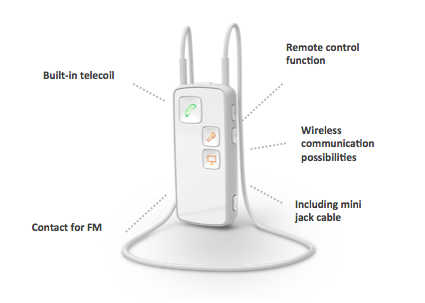
Figure 1. Ponto Streamer.
On the front of the Streamer Pro are pictures of a phone, a microphone, and a TV, so it is clear for the patient how to connect to those devices. There is a connection for the FM on the bottom. There's also a mini mic cable. An auxiliary button is on the side, and on/off is on the top. Figure 2 shows the Ponto Streamer and some of the functions of the buttons and plugs.
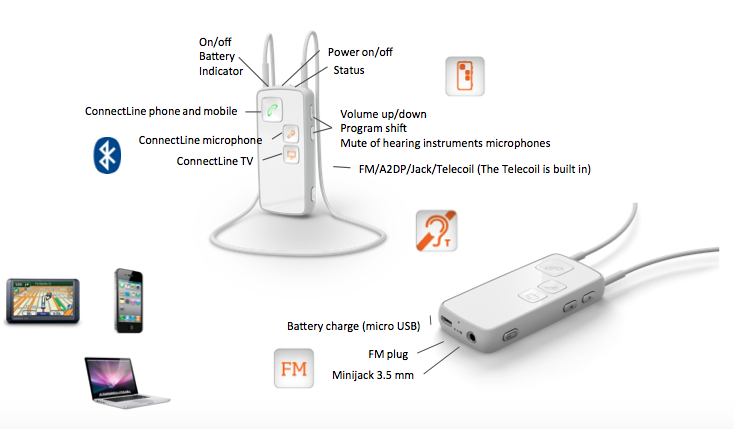
Figure 2. Ponto Streamer button/plugs.
By holding the on/off button, you can pair the Streamer to a cell phone or to any of the accessories. There are two lights on the top: one is the battery and the other is the status indicator. The status indicator may be either green or orange. When it's blinking orange, it's looking for an auxiliary device. If it's a solid orange, it is connected. For example, to connect to music on your phone, you would turn it on, and press the auxiliary button. When the music is playing, it would turn to a solid orange.
This Ask the Expert is an excerpt from the CE Course, Wireless Technology: How to Connect FM and Other Accessories Wirelessly to the Ponto Device.
Continued and its subsidiaries provide professional education authored by qualified Subject Matter Experts for continuing education purposes. These materials are intended for educational purposes and do not constitute medical advice or a substitute for individual clinical judgment. Continued is not a clinical healthcare provider; the licensed professional is solely responsible for ensuring that the application of any techniques or information presented is within their legal scope of practice and jurisdictional requirements.